How My Home Network Works — And Why I Keep Two Kubernetes Repos for One Cluster
· #infrastructure #homelab #k3s #talos #networking #wireguard #firewalla #argo-cd #self-hosting
I run a home network that is more carefully segmented than most small offices. This isn’t performative over-engineering — I actually use every layer, and when something breaks at 2 AM I want to know exactly which hop failed without guessing.
This post is the public version. The network topology, the cluster architecture, and the GitOps workflow are all documented in the open. The actual manifests for the full cluster live in a private repo, because not everything I self-host needs to be interview material. What you’re reading is the curated portfolio: the parts I’m comfortable showing, and the reasoning behind the parts I’m not.
The Topology
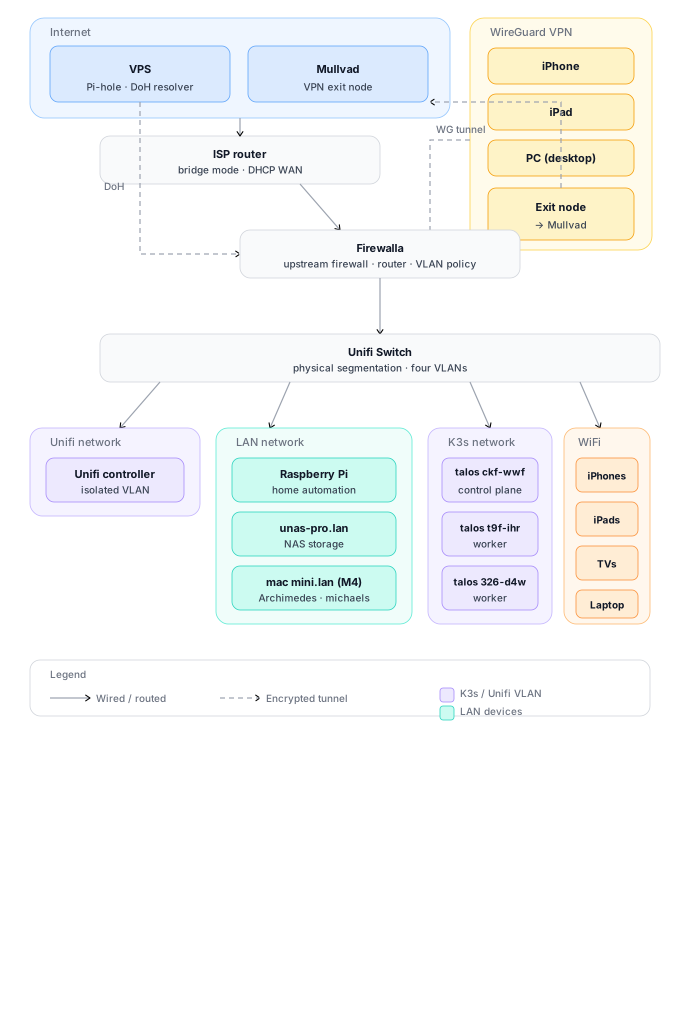
Five layers, each with a specific job. No layer trusts the others by default. Traffic is filtered at every hop.
Layer 1: The Edge
The internet connection enters through an ISP router running in bridge mode — it does nothing except hand a DHCP WAN address to the Firewalla. No NAT, no routing, no firewall logic lives there.
Firewalla sits directly behind it and handles everything else:
- Intrusion detection — Suricata-based, not just port blocking
- Ad blocking at the network layer — Pi-hole gets the DNS, but Firewalla drops trackers before they resolve
- VPN routing — WireGuard peers terminate here, not on the cluster
- Network segmentation — all VLAN policy and cross-network firewall rules live here
- Device profiling — every MAC gets a fingerprint; new devices alert my phone
The Firewalla is also where DNS over HTTPS terminates. I run a VPS with a Pi-hole container that acts as a DoH resolver — encrypted DNS queries go from the Firewalla out to the VPS, so my ISP never sees what domains I’m resolving, and I get Pi-hole’s blocklist applied before anything hits the network. The VPS is also where *.lan internal resolution lives, so every service in the cluster has a human-readable name without leaking internal topology to a public DNS provider.
I moved off consumer routers years ago. The threat model for a home lab is different from a typical house: I have public-facing services, a Kubernetes cluster with persistent volumes, and multiple VPN tunnels. A standard router with UPnP enabled is a liability in that environment.
Layer 2: The Switch
A Unifi Switch sits downstream of the Firewalla and handles physical network segmentation — no cloud key, no Unifi account, local controller only. The segmentation policy itself lives on the Firewalla; the switch is what physically separates the traffic into four networks:
| VLAN | Purpose | Devices |
|---|---|---|
| Unifi | Management | Switch admin (isolated) |
| LAN | Trusted devices | Mac mini, NAS, Raspberry Pi, workstations |
| K3s | Cluster | Talos nodes, K3s pod network |
| WiFi | Wireless clients | iPhones, iPads, TVs, laptop |
Port profiles on the switch give the Talos nodes full bandwidth and jumbo frames for Longhorn replication. TVs and IoT devices get isolated ports with rate limiting. The NAS and Mac mini have link aggregation pairs to the switch so storage and container traffic doesn’t bottleneck on a single gigabit link.
Cross-VLAN traffic is denied by default at the Firewalla. If the smart TV gets compromised, it can’t reach the cluster. This sounds paranoid until you read about the latest IoT botnet.
Layer 3: WireGuard VPN
Remote access is through WireGuard, not an open port on the cluster. The tunnel terminates at the Firewalla, and I run a split tunnel: only traffic destined for the cluster or LAN routes through the VPN. Regular browsing goes out normally.
Why split tunnel? Two reasons:
- Performance — I don’t want Netflix going through my home upload bandwidth
- Leak surface — If the VPN drops, only cluster traffic leaks to the local network, not everything I’m doing
The WireGuard peers are my phone, iPad, and desktop PC. Each gets a static IP in the 10.200.0.0/24 range. The Firewalla filters by peer IP, so even if someone stole my private key, they’d still need to spoof my assigned address to reach the cluster.
The setup also runs a Mullvad exit node. When a WireGuard client connects, they come back into the home network for local resource access — hitting the cluster, the NAS, whatever their peer scope allows — and then egress through a Mullvad endpoint. They get local access and a clean VPN address at the same time.
Layer 4: The K3s Cluster
Three Talos Linux nodes on the K3s VLAN. Talos is immutable — no SSH, no package manager, no shell. The OS is a single image that boots from disk and runs Kubernetes. If a node dies, I PXE boot a replacement, it joins the cluster, and Longhorn rebalances the storage replicas automatically.
| Hostname | Role | Notes |
|---|---|---|
| talos-ckf-wwf | Control plane | etcd + API server + scheduler |
| talos-t9f-ihr | Worker | General workloads |
| talos-326-d4w | Worker | General workloads |
Control plane runs no pods. Workers handle everything. If a worker fails, pods reschedule and Longhorn rebuilds the replica. If the control plane fails, the cluster keeps running (etcd quorum permitting) until I replace it.
Why K3s and not full K8s? Because I’m running this on a mix of recycled hardware and a Mac mini. K3s is a certified Kubernetes distribution that fits in 512 MB of RAM. Full K8s would need more overhead than I have. The trade-off is negligible for a home lab: I don’t need the full API server feature set, and K3s ships with a working local-path provisioner and Traefik ingress out of the box.
I replaced the default Traefik with nginx-proxy-manager for ingress. Traefik is fine, but I wanted a UI for managing SSL certs and reverse proxy rules. Nginx-proxy-manager gives me Let’s Encrypt automation without editing YAML for every new subdomain.
Layer 5: WiFi
Unifi APs serve the WiFi VLAN. iPhones, iPads, TVs, and the laptop connect wirelessly. The TVs can reach Plex (on the cluster, via nginx-proxy-manager) but they cannot talk to the NAS or reach any Talos node. Trusted personal devices connect to a separate SSID that bridges to the LAN VLAN so they can reach the cluster directly.
This is where most home networks fail: everything on one flat subnet, hoping device isolation works at the application layer. It doesn’t.
LAN Devices
The LAN network has a few key machines worth calling out:
Mac mini (M4, 16 GB) — This is where Archimedes lives, my personal AI agent. It also runs Docker for workloads that don’t need to be in the cluster. Gets an LACP link to the switch for throughput.
unas-pro.lan — NAS storage. Longhorn backs up to S3 from here. Also gets a link aggregation pair.
Raspberry Pi — Home automation. Lives on the LAN VLAN, isolated from cluster traffic.
The Cluster Stack
Talos Linux (immutable OS)
  → K3s (lightweight Kubernetes)
    → ArgoCD (GitOps sync)
      → Kustomize (DRY manifests)
        → Longhorn (replicated block storage)
          → nginx-proxy-manager (ingress + SSL)
ArgoCD GitOps
Every application is a directory in the repo:
Apps/
├── longhorn/       # Distributed block storage
├── windows/        # Windows 11 VM via KubeVirt
├── pairdrop/       # Local file sharing
└── minecraft/      # Game server
Each app follows the same pattern:
<app>/base/
├── kustomization.yaml
├── namespace.yaml
├── pvc.yaml
├── deployment.yaml
└── service.yaml
The workflow is:
- Edit manifest locally
git commit && git push- ArgoCD detects the change (polls every 3 minutes)
- ArgoCD applies
kubectl apply -k <app>/base/ - Pods roll out with the new config
No manual kubectl apply in production. If I break something, I git revert and ArgoCD rolls back.
Longhorn Storage
All persistent volumes use Longhorn with 3 replicas across nodes. If a node goes down, the volume is still readable from the remaining replicas. Longhorn also handles snapshots (manual and scheduled), encrypted S3 backup, and live volume expansion without downtime.
apiVersion: v1
kind: PersistentVolumeClaim
metadata:
  name: openclaw-data
spec:
  accessModes:
    - ReadWriteOnce
  storageClassName: longhorn
  resources:
    requests:
      storage: 10Gi
Why Two Repos for One Cluster
I maintain two GitHub repos for the same cluster:
- mentholmike/k3s — Public portfolio. Clean, interview-safe manifests for a subset of apps
- mentholmike/kube — Private. Everything else
The public repo is what you’d show a hiring manager. It’s the apps that are universally understood: storage, a Windows VM, file sharing, a game server. The private repo contains the rest — personal workloads, media automation, and other tools that aren’t relevant to a professional portfolio.
The split isn’t about hiding anything sketchy. It’s about context boundaries. A recruiter doesn’t need to see my personal media setup to evaluate whether I can run a Kubernetes cluster. The public repo is curated for that purpose. The private repo is for me.
Both repos use the same Kustomize structure, the same ArgoCD integration pattern, and the same Longhorn storage backend. The only difference is which apps are included.
The public repo also has a GitHub Pages site at https://k3s.wagmilabs.fun that renders the README as a clean portfolio page.
What This Cost
Hardware:
| Item | Cost |
|---|---|
| Firewalla | ~$500 (one-time) |
| Unifi Switch + APs | ~$250 (one-time) |
| Talos nodes | Recycled mini PCs, ~$150 total |
| NAS | Existing Unas Pro |
| Mac mini | Existing (M4, 16 GB) |
Software: Everything is open source except the Firewalla firmware. Talos, K3s, ArgoCD, and Longhorn are all free. Domains run about $12/year each.
Time:
| Task | Time |
|---|---|
| Network design | ~1 weekend |
| Talos + K3s bootstrap | ~2 evenings |
| ArgoCD + GitOps setup | ~1 evening |
| Longhorn tuning | ~1 evening |
| VLAN segmentation and firewall rules | ~1 evening |
The ongoing cost is near zero. The real investment was the time to understand each layer well enough to debug it without guessing.
What I Learned
VLANs are free security. It costs nothing to put your TV on a different subnet than your Kubernetes control plane. Most home networks skip this because it’s “complicated.” It isn’t. It’s a few extra clicks in the Firewalla dashboard.
Immutable OS is worth the friction. Talos has no shell. You can’t SSH in and fix things by hand. Everything goes through the API. This sounds restrictive until you need to rebuild a node at midnight and realize the replacement boots the exact same image without drift.
GitOps is the only way I trust myself. I’ve accidentally deleted production namespaces with kubectl delete. I’ve applied the wrong manifest to the wrong cluster. ArgoCD with a single source of truth in Git means the worst I can do is commit a bad change — and that’s reversible.
Split public and private repos is a skill, not a sin. Hiring managers look at GitHub. They shouldn’t have to sift through your personal media stack to find the infrastructure work. Curate your public face. Keep the private stuff private. Both can be real work.
The boring networking work is the actual infrastructure. Kubernetes is flashy. Longhorn is flashy. The VLAN layout, the firewall rules, the DNS resolution chain, the WireGuard peer config — that’s the part that keeps everything working. Nobody writes blog posts about firewall rules. They should.
The Code
Everything public is open source:
- Public K3s portfolio: github.com/mentholmike/k3s
- Portfolio site: k3s.wagmilabs.fun
- This site: github.com/mentholmike/mwyatt.me
If you’re building something similar, steal what works, ignore what doesn’t, and tell me what you did differently.